 Why You Can Trust CNET
 Apple iMac (summer 2010) review: Apple iMac (summer 2010)
Apple iMac (summer 2010)


Editors' note: As of May 3, 2011, the 2010 iMac reviewed here has been replaced with a newer model. The 2011 line offers faster second-generation (Sandy Bridge) CPUs, improved AMD graphics, and Thunderbolt ports. See the 2011 Apple iMac line-up.
Apple iMac (summer 2010)
The Good
The Bad
The Bottom Line
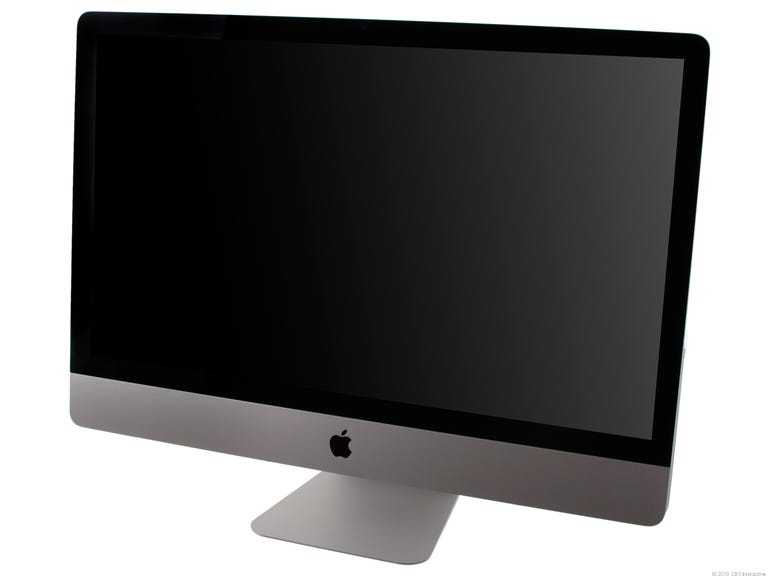
Introduced 10 months ago, Apple's original 27-inch iMac would arguably still be competitive today because of the continued absence of a Windows all-in-one computer with a screen larger than 24 inches. After a model update a few weeks ago, Apple has also kept the performance of its 27-inch, $1,999 iMac competitive by adopting a quad-core Intel Core i5 CPU and a fast AMD graphics chip. As with the new 21.5-inch iMac, Apple bypassed several opportunities to improve the 27-inch model as a home entertainment hub. We can easily recommend this new iMac to anyone looking for a large screen all-in-one for productivity or gaming. And while Apple's loyalty to DisplayPort adds some annoying hurdles to using the iMac as a digital-media hub, the 27-inch screen is big and beautiful enough to make up for the extra hassle.
The chief change Apple made across the iMac line is its move away from Intel's Core 2 Duo CPUs, replacing them with Intel's Core i3, Core i5, and Core i7 CPUs exclusively. While the previous $1,999 iMac already had a quad-core 2.66GHz Core i5 CPU, the new model comes with a 2.8GHz version with four distinct CPU cores.
In addition to a marginally faster CPU, Apple gave the $1,999 iMac a few other hardware changes. The company switched to using 1,333MHz DDR3 RAM, an upgrade from the 1,066MHz DDR3 the previous model had. It also upgraded the SD card slot to support the SDXC format, which supports cards up to 2TB in capacity. The biggest change comes by way of the new graphics card, the 1GB ATI Radeon HD 5750. An improvement over the generation-old 512MB Radeon HD 4850 used in the previous model, the new 3D card has big implications for gaming on this new iMac.
Otherwise, Apple has left the award-winning iMac formula largely the same. The 27-inch, LED-backlit display remains just as impressive as before, not least because of its 2,560x1,440-pixel resolution. Apple has also retained the glossy screen coating that turns some people off. Apple includes 802.11n wireless networking, an iSight Webcam, the wireless Apple Magic Mouse and Apple Wireless Keyboard, and a DVD burner with the system as well. We encourage those hoping that Apple will someday incorporate a Blu-ray drive into its Macs to let go of that dream. Regardless of how much we might want it, we're skeptical that Apple will ever add a bidirectional HDMI port instead of or alongside its Mini-DisplayPort connection.
| Apple iMac 27-inch | Lenovo IdeaCentre B500 08873AU | |
|---|---|---|
| Price | $1,999 | $1,399 |
| Display size/resolution | 27-inch, 2,560x1,440 pixels | 23-inches, 1,920x1,080 pixels |
| CPU | 2.8GHz Intel Core i5 760 | Intel Core 2 Quad Q8400S |
| Memory | 4GB 1,333MHz DDR2 | 6GB 1,066MHz DDR2 SDRAM |
| Graphics | 1GB ATI Radeon HD 5750 | 1GB Nvidia GeForce GT 250M |
| Hard drives | 1TB, 7,200rpm | 1TB, 7,200rpm |
| Optical drive | dual-layer DVD burner | Blu-ray/DVD-burner combo drive |
| Networking | Gigabit Ethernet; 802.11n wireless networking | Gigabit Ethernet. 802.11b/g/n, Bluetooth |
| Operating system | Apple OS X 10.6.4 | Windows 7 Home Premium (64-bit) |
Just because Apple resists adding a particular feature, it still has to face competition from vendors that have embraced it. We use the term "competition" loosely here as no Windows vendor sells an all-in-one desktop with a 27-inch display. Instead it competes against an assortment of 24-inch models with varying features and prices. The Lenovo IdeaCenter B500 is the most expensive all-in-one Windows system we've reviewed so far this year, but it costs $600 less than this iMac. While it has a Blu-ray drive, it also has a slower CPU, a slower graphics card, and no way to input an external video signal. The Lenovo is a decent home entertainment PC, but it's not very versatile.
Similar all-in-ones systems from Sony and Hewlett-Packard also have Blu-ray drives as well as HDMI ports. Unlike the iMac, with those systems you can connect game consoles, cable TV boxes, and other external video components to them without buying an expensive adapter.
That said, between its large display and fast new components, the new iMac is ideally suited for productivity. You can also make it work as a consolidated home entertainment system if you're willing to spend about $150 for an HDMI-to-mini DisplayPort adapter such as the Belkin AV360. Apple adding an HDMI port would be a far simpler solution, but given the iMac's large screen and fast performance, we imagine more than a few people in the market for an all-in-one media hub would be willing to pay extra for the iMac-and-adapter combination. If Apple added HDMI to the 27-inch iMac, we would have a difficult time arguing for any other high-end all-in-one. For now, we still think highly of this system, but its dependence on an adapter for home entertainment sticks out like a blemish.
(Shorter bars indicate better performance)
(Shorter bars indicate better performance)
(Shorter bars indicate better performance)
(Longer bars indicate better performance)
 | Rendering multiple CPUs | | Rendering single CPU |
The Lenovo all-in-one PC we reviewed is the closest to the iMac performancewise, but that's not saying too much. The HP and Sony systems mentioned above might fare better, the HP especially since it at least has the mobile version of Intel's Core i7 CPUs. However, from all indications on paper and in our lab, the 27-inch iMac is the fastest all-in-one currently available. We included the $1,199 Gateway FX6840-03e tower desktop to illustrate that you can still build a standard PC that can compete with the iMac for a much lower cost. For all-in-one purists, the iMac is the clear choice if productivity is your top priority.
(Longer bars indicate better performance)
| Maximum settings (2,560x1,440) | | Recommend settings (2,560x1,440) |
We can also report positively about the iMac as a gaming platform. Yes, the Mac gaming library is still limited compared with that of Windows, but Valve Software's recent release of a Mac version of its Steam digital game distribution service has already paid off with Valve bringing its popular first-person games Half-Life 2, Portal, and Team Fortress 2 to Macs. The three games we tested all use Valve's Source 3D graphics engine, so we can't say that you'll see similar scores across all titles available for the Mac. Still, we were glad to see that even at full resolution and maximum image quality settings, the iMac was able to handle all three games relatively well. Using the more forgiving "recommended" settings for each game (as denoted by an asterisk in each game's video options tab), we saw even better performance with relatively little drop-off in image quality.
Even before Valve came along, World of Warcraft, Starcraft, and Diablo-maker Blizzard Software has historically been committed to the Mac platform. Doom and Quake-developer id Software has also shown similar loyalty. Among those three vendors, that's an impressive array of quality games available for the Mac, and the list is growing. Popular role playing game Dragon Age: Origins also has a Mac version, and the cloud gaming service OnLive supports a variety of titles that work with OS X. Windows PCs will remain the gaming enthusiasts' primary choice because of their upgradeability, at least for the foreseeable future; however, with the expanded Mac gaming library and this system's fast new ATI graphics card, we can confidently recommend this iMac for gaming.
Aside from our gripes about the iMac's video inputs, we're relatively happy with the other ports on the back of this system. You get four USB 2.0 port, a pair of audio jacks, a FireWire 800 port, and an Ethernet adapter. Both eSATA and USB 3.0 are faster data throughput options than FireWire 800, so those who face bottlenecks from large data transfers might feel some frustration at Apple's loyalty to the IEEE 1394 standard. For most consumers, the iMac's existing ports will be sufficient.
 Juice box Juice box | |
| Apple iMac 27-inch (2.8GHz Intel Core i5) | Average watts per hour |
| Off | 0.85 |
| Sleep | 1.19 |
| Idle | 41.83 |
| Load | 238.64 |
| Raw (annual kWh) | 237.39162 |
| Energy Star compliant | Yes |
| Annual power consumption cost | $26.94 |
As usual, Apple's power management skill is evident in this iMac. We always appreciate a desktop that is both more efficient and faster than competing systems. As with the 21.5-inch iMac, we noted that this 27-inch model was extremely hot on the back panel, especially after gaming. A handheld laser thermometer showed temperatures as high as 118 degrees over the area on the back panel we assume concealed the graphics card. Most other all-in-ones we've tested come in around 85 degrees. You'll want to be sure to keep the iMac in a place where it has plenty of ventilation to avoid it overheating.
Finally, we continue to find Apple's service and support policies cynically structured to encourage you to spend money. You get 90 days of toll-free support and a yearlong warranty by default. After that, you can either refer to Apple's Web site, a Genius Bar, an Apple-authorized service provider, or pay $169 for three years of phone service via AppleCare, which also extends your warranty to three years. That all-or-basically nothing approach for phone support puts Apple at odds with the rest of the PC industry that typically includes at least a year of phone support, if not a lifetime of coverage, at no additional charge.
Find out more about how we test desktop systems.
System configurations:
Acer Aspire Z5700-U2112
Windows 7 Home Premium SP1 (64-bit); 3.2GHz Intel Core i5 650; 4GB 1,066MHz DDR2 SDRAM; 128MB (shared) Intel GMA X4500 HD; 1TB 7,200rpm Western Digital hard drive
Apple iMac (21.5-inch, Summer 2010)
Apple OS X Snow Leopard 10.6.4; 3.06GHz Intel Core i3; 4GB 1,333MHz DDR3 SDRAM; 256MB ATI Radeon HD 4670 graphics card; 500GB 7,200rpm Seagate hard drive
Apple iMac 27-inch
Apple OS X Snow Leopard 10.6.4; 3.06GHz Intel Core i3; 4GB 1,333MHz DDR3 SDRAM; 256MB ATI Radeon HD 4670 graphics card; 500GB 7,200rpm Seagate hard drive
Gateway FX6840-03e
Windows 7 Home Premium (64-bit); 2.8GHz Intel Core i7 860; 8GB 1,333MHz DDR3 SDRAM; 1GB ATI Radeon HD 5770; 1TB 7,200rpm Seagate hard drive
Lenovo IdeaCentre B500 08873AU
Windows 7 Home Premium; 2.66GHz Intel Core 2 Quad Q8400S; 6GB 1,066MHz DDR2 SDRAM; 1GB Nvidia GeForce GT 250M; 1TB 7,200rpm Seagate hard drive