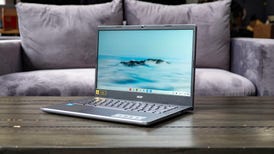
Dell I15-156B

Pricing not available

Dell I15-156B - KEYBOARD Dell I15-156B - LAP Dell I15-156B - BAG
Scroll Left Scroll Right
  • Dell I15-156B - KEYBOARD
  • Dell I15-156B - LAP
  • Dell I15-156B - BAG

CNET Editors' Review

The good: Dual-core CPU and 3GB of RAM for the same price as a Netbook; 16:9 wide-screen display.

The bad: Very stripped-down design, missing the media controls and HDMI port from previous low-end Inspirons.

The bottom line: For less than $500, the Dell Inspiron I15-156B offers few frills, but is about as cheap as a dual-core laptop gets.

Review:

Editors' note: This review is part of our Winter 2009 Retail Laptop Review Roundup, covering specific configurations of popular laptops that can be found in retail stores.

A decent Netbook configuration, with an Intel Atom CPU, 1GB of RAM, Windows XP, and a good-size hard drive will run you about $499, or the same as this basic 15-inch Inspiron I15-156B laptop from Dell.

Trading away size and portability, you get a dual-core Intel CPU (but not an official Core 2 Duo), 3GB of RAM, a 160GB hard drive, Windows Vista, and something foreign to Netbook users--a DVD burner. For another $ ... Expand full review

Editors' note: This review is part of our Winter 2009 Retail Laptop Review Roundup, covering specific configurations of popular laptops that can be found in retail stores.

A decent Netbook configuration, with an Intel Atom CPU, 1GB of RAM, Windows XP, and a good-size hard drive will run you about $499, or the same as this basic 15-inch Inspiron I15-156B laptop from Dell.

Trading away size and portability, you get a dual-core Intel CPU (but not an official Core 2 Duo), 3GB of RAM, a 160GB hard drive, Windows Vista, and something foreign to Netbook users--a DVD burner. For another $150, you can trade up to Dell's similar Inspiron I15-157B, which doubles the HDD and has a faster Core 2 Duo T6400 CPU.

The cheaper 156B model performed well against similarly priced laptops (many in this price range have AMD processors), but we were disappointed by its poor battery life compared with our favorite current entry-level retail laptop, the HP G60-235DX.

Price as reviewed $499
Processor 2.16GHz Intel Dual Core T3400
Memory 3GB, 667MHz DDR2
Hard drive 160GB 5,400rpm
Chipset Mobile Intel GM45 Express Chipset
Graphics Intel GMA 4500MHD (integrated)
Operating System Windows Vista Premium
Dimensions (WD) 14.6x9.3 inches
Height 1.1-1.4 inches
Screen size (diagonal) 15.6 inches
System weight / Weight with AC adapter 5.7/6.5 pounds
Category Mainstream

Nearly identical physically to the Inspiron I15-157B, the 156B trades that model's matte black lid for a glossy midnight blue. We think the matte look is a little classier, but that aside, the two laptops would be difficult to tell apart, even if sitting right next to each other.

While it is never going to be mistaken for a high-end laptop, its plastic construction at least offers simple, clean lines. This is the laptop cast as commodity, aiming to provide the best value for the dollar (it may not entirely succeed, but it at least makes a good argument).

The keyboard is the same full-size model found on Dell's other Inspiron laptops; it feels solid and hardly flexes under the fingers. The individual letter keys are a bit too tapered for our tastes, but they are perfectly functional. Missing are the media control buttons we've become accustomed to finding on even low-end Dell laptops--a victim of cost-cutting, perhaps. While there's no fingerprint reader, you do still get a built-in 1.3-megapixel Webcam.

The 15.6-inch wide-screen LCD offers a 1,366x768-pixel native resolution, which is standard for budget-minded 16:9 systems, and the same as the more expensive Inspiron I15-157B. By way of comparison, Dell's online version has a 15.4-inch 16:10 screen, with a 1,280x800-pixel resolution.

  Dell Inspiron I15-156B Average for category [mainstream]
Video VGA-out VGA-out, HDMI
Audio Stereo speakers, headphone/microphone jacks Stereo speakers, headphone/microphone jacks
Data 3 USB 2.0, SD card reader 4 USB 2.0, SD card reader
Expansion ExpressCard/34 ExpressCard/54
Networking Ethernet, 802.11 b/g Wi-Fi, Ethernet, 802.11 b/g/n Wi-Fi, Bluetooth, optional WWAN
Optical drive DVD burner DVD burner

While you're probably not going to be hooking up a budget machine like this to a big-screen TV via HDMI, we do miss Bluetooth, which was quickly becoming standard equipment in even the least expensive systems. However, finding an ExpressCard slot in a $499 laptop is a nice extra, and is useful for adding a mobile broadband modem.

Most of the laptops in the Entry Level section of out Winter 2009 Retail Roundup (covering laptops up to $599) have AMD processors. These systems, for the most part, were slower than the two entry-level Intel-powered systems we tested, the HP G60-235DX and this one, the Dell Inspiron I15-156B. Unlike some of our previous low-end Intel versus AMD comparisons, it wasn't a blowout, and the real-world performance difference will be minimal.

All these systems are acceptable for basic multitasking--Web surfing, working on office documents, and media playback--and will handle multiple applications much better than an Intel Atom-powered Netbook. Running too many applications or opening too many windows at once will lead to slowdown, so keep your expectations modest.

Hide Review

User Reviews

Be the first to rate this product

Write a Review

Quickly sign in with: or Log in or create an account to post a review.
Add Your Opinion

The posting of advertisements, profanity, or personal attacks is prohibited. Click here to review our site terms of use.

Where to Buy

Pricing not available

Compare to Editors' Top s

See All Best s

Sponsored Premier Brands on CNET

Where to Buy

Pricing not available

Which laptop is right for me?

Laptop Finder

While a laptop has become a ubiquitous accessory for modern life, the actual process of choosing the right model can take some serious time and research.

In this guide, we'll outline the different categories of laptops and which types are best for different users. We'll also take a look at CPU, hard-drive, and networking options.

We've compiled a handful of typical user experiences that should help outline what type of laptop is right for you. Chances are, you'll fall somewhere in between two or more of these archetypes, so carefully consider what you'll be using your new laptop for.

Read our guide | Laptop finder